
Open now, 14-day free trial
From the price list to the punch list.
Load your manufacturer’s price list and your multiplier. Draw the wall. Quote by SKU, order the boxes, count them at the curb and close the install, all on the same job.
- Your price list, your multiplier Import the manufacturer’s PDF or spreadsheet, review it, set the multiplier per manufacturer.
- Priced from the drawing Draw the wall and every box lands on the quote by SKU, with install labor on its own lines.
- Approved and paid online The homeowner opens a link, approves the quote and pays the deposit by card. Payments are provided by Intuit Payments Inc.
- In 3D before it is built The same drawing opens as a 3D link the homeowner turns on a phone, and AI renders show the kitchen finished.

Live 3D. Drag to turn it.

AI render of the 3D view

AI render, staged as a lived-in home
| SKU | Qty | List | Your cost |
|---|---|---|---|
| W3030 | 3 | $318 | $400.68 |
| B24 | 1 | $412 | $173.04 |
| SB36 | 1 | $486 | $204.12 |
| DB36 | 1 | $758 | $318.36 |
| Boxes at list × 0.42 | $1,096.20 | ||
Works inside Claude and ChatGPT
Ask “Where is the Carter job, did the order ship?” and get the answer from your own Cabinet Project, read only. How it works
One kitchen, start to finish.
Every cabinet job goes through the same hands: the person who quotes it, the manufacturer who ships it, the crew who hangs it, the homeowner who pays for it. Here is an example job as it reads inside Cabinet Project, with screens from the app on a test account.
-
Mon
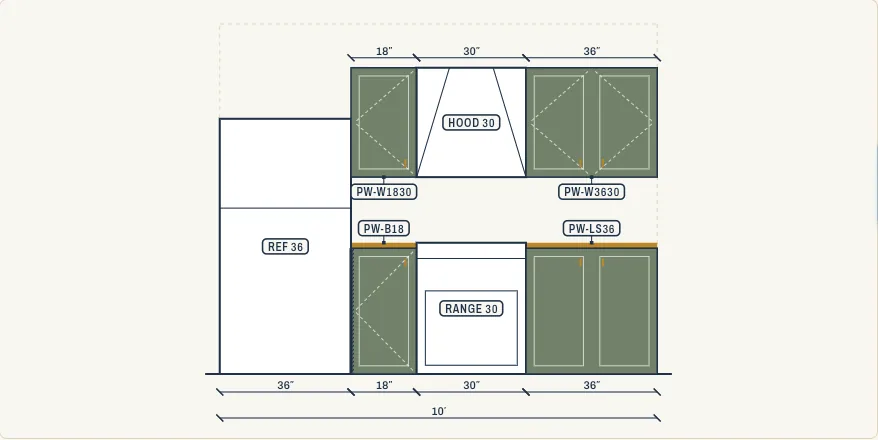
Measure and draw the wall
Walls, openings and boxes snap on a plan. The elevation and the box list come out of the same drawing, fillers included.
-
Tue
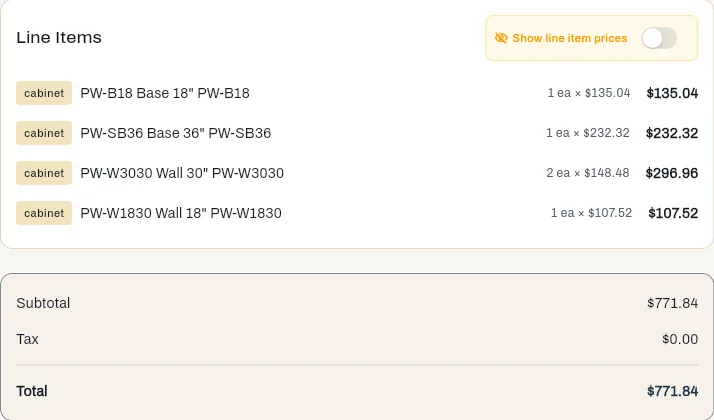
Quote by SKU, not by guess
Each box is priced from the manufacturer’s price list times your multiplier, plus install labor by box or by linear foot. Change the door style and the quote reprices.
-
Wed
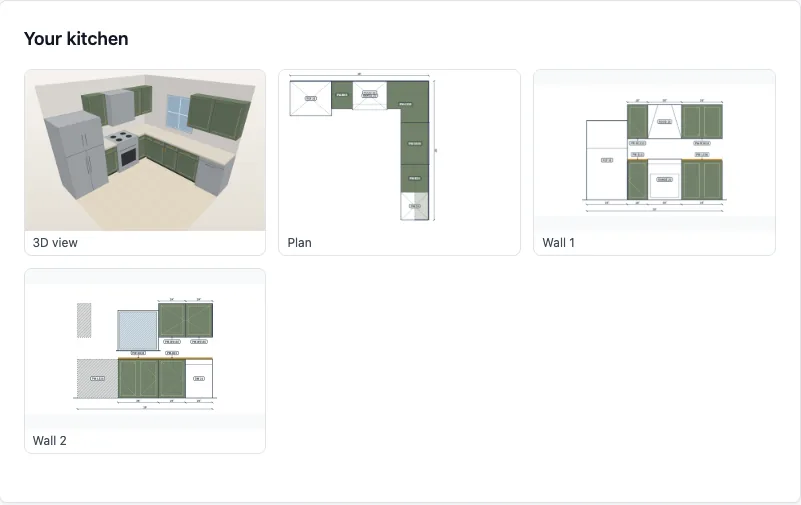
Homeowner sees it, approves, pays the deposit
A link opens their quote, the layout, the kitchen in 3D to turn on their phone and an AI render of it in the chosen finish. They approve and pay by card in the customer portal, a payment service provided by Intuit Payments Inc. through your QuickBooks Payments account.
-
Thu
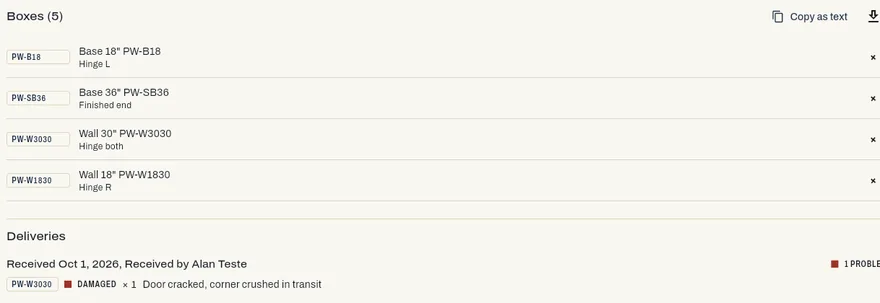
Order the boxes
The approved list becomes the order to your manufacturer, with your PO, line, finish and quantities. Status and ETA stay on the job.
-
Day 12
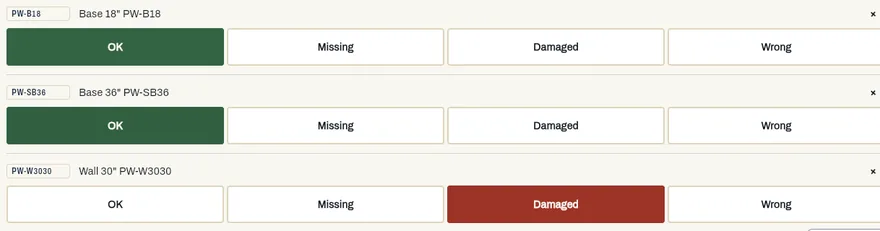
Truck arrives. 41 of 42 boxes.
Check each box off on the phone at the curb. A W3030 has a crushed corner: take two photos and the claim e-mail goes to the manufacturer before the driver leaves.
-
Day 15
Install, punch list, final invoice
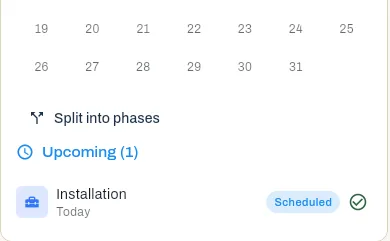
The crew sees the route and the job. Punch items get a photo and a name. The last invoice goes out from the job and syncs to QuickBooks.


See it in the app.
Every picture here is the live app, recorded with a test dealer account. The names, prices and the kitchen are test data; the screens are not mockups.


The claim starts at the curb.
Missing and damaged boxes cost the most when you find them on install day. Delivery check counts the order box by box, so the claim leaves with photos while the truck is still there.
Who it is for
For the showroom
Independent RTA and semi-custom dealers who quote from several manufacturers. Price lists come in from a PDF or spreadsheet with a review step, multipliers are set per manufacturer, and every quote goes out as a branded PDF.
For the crew
Installers who carry the boxes and hang them. The day’s route, the delivery check, punch list photos and the job’s notes are on the phone, in English, Spanish or Portuguese.
Not for
CNC and production runs. Mozaik and Cabinet Vision do that; Cabinet Project starts where the boxes are already built, and the drawing still exports a cut list (.csv) and a cutting plan on 4x8 sheets (.pdf) when you build a few yourself.
Priced per company, not per seat.
Launch pricing in USD. Every paid plan has the whole workflow; plans differ in people, storage and kitchen renders. Annual billing gives two months free. Paid plans open with a 14-day trial without a card.
| Plan | Users | Monthly | Annual | Renders / mo |
|---|---|---|---|---|
| Free | 1 | $0/mo | — | 5 |
| Solo | 1 | $59/mo | $590/yr | 50 |
| Team | 3 | $99/mo | $990/yr | 150 |
| Shop | 5 | $149/mo | $1,490/yr | 300 |
| Crew | 10 | $249/mo | $2,490/yr | 600 |
Free is one user and three quick quotes a month, with a Cabinet Project branded PDF. Extra users on Team and up are $15 a month each.
Outside the United States
The app bills your company's country in its own currency; annual is ten months. Brazil, Mexico and the US-dollar list need your company's tax ID in the app, otherwise checkout uses the US list. Middle and low income follow the World Bank's country list; any other country pays the US list. In the App Store and Google Play the store shows the price for your country.
| Market | Solo | Team | Shop | Crew |
|---|---|---|---|---|
| Canada | C$85 | C$139 | C$209 | C$349 |
| United Kingdom | £45 | £75 | £115 | £189 |
| Australia | A$85 | A$139 | A$209 | A$349 |
| Euro area | €55 | €89 | €135 | €225 |
| Brazil | R$149 | R$249 | R$379 | R$599 |
| Mexico | MX$599 | MX$999 | MX$1,499 | MX$2,499 |
| Latin America, India and other middle- or low-income countries | US$29 | US$49 | US$79 | US$129 |
Questions dealers ask first.
Can I use Cabinet Project today?
Yes. Sign up in the app and every paid plan opens with a 14-day free trial, no card needed. If you want a hand, write to us with your company and the manufacturers you sell and we set up your catalog with you.
Which manufacturers does it work with?
Any line you sell. You load the manufacturer's price list from a PDF or spreadsheet, review it, and set your multiplier per manufacturer. There is no direct ordering integration with manufacturers; the order goes out as a PO you send the way you already do.
Is it for dealers or for custom cabinet shops?
Dealers and installer crews who sell and install RTA and semi-custom cabinets. The drawing exports a cut list (.csv) and a cutting plan on 4x8 sheets (.pdf) for a shop that builds a few boxes; CNC programs are out of scope.
Does it work on a phone at the jobsite?
Yes. The same app runs on phone, tablet and desktop, in English, Spanish and Portuguese. Delivery checks, punch lists and photos are made for the phone.
Does it connect to QuickBooks?
Yes. Invoices and payments sync to QuickBooks Online.
Bring one real kitchen.
We set up your catalog with you. Send us your company name, the manufacturers you sell, and a recent kitchen. We load your price lists and multipliers and price that kitchen with you.
info@designmastersolutions.com
Rather start on your own? Start your 14-day free trial, no card needed. Already have an account? Sign in to the app.